DesignSense AI
- 3.2
- Rating
- 100.00K
- Installs
- Free
- Price

 Analysis by App-foxy
DesignSense AI is the kind of interior design app I would open when I have a room that feels wrong but cannot yet explain why. Instead of beginning with a blank drawing board, I can use it as a visual starting point for exploring how a space might look. That makes it more approachable than traditional design software, especially when I am thinking about a living room refresh, a bedroom rearrangement, or a new color direction rather than preparing professional construction documents.
The app comes from Sictec Infotech Inc. and sits in the Art & Design category. It is free to install, with optional in-app purchases ranging from $5.99 to $400.00 per item. That combination matters: I can try the basic experience without paying upfront, but I would still treat any paid option carefully until I understand exactly what it adds to my workflow.
My overall impression is mixed but useful. DesignSense AI can shorten the distance between an idea and a visual reference, yet it is not a substitute for measuring a room, checking furniture dimensions, or making practical renovation decisions. I see it as an idea generator and planning companion, not as a complete professional interior-design package.
You May Also Like

 Blood Strike: 2.5 Anniversary
Blood Strike’s Loadouts Turn Every Drop Into a Tactical Gamble
A close look at Blood Strike’s custom loadouts: how fast access to signature weapons reshapes its battle royale rhythm, rewards preparation, and narrows the gap between fights.

 Pandora - Music & Podcasts
Pandora’s Music Is Easy to Start, but Harder to Recover
Pandora’s strength is its low-effort path from a seed to a station. Its weak spot is how much confidence it asks you to place in connection, setup, and quiet recovery.

 8 Ball Pool
 Is Built on Rivalries, Rematches, and Routine
A close look at the rivalries, rematches, shared routines, and unanswered safety questions that turn a quick pool match into a persistent mobile community.

 Samsung Music
’s Quiet Strength Is Playing What You Already Own
Its reach comes less from spectacle than from dependable access to a personal library. That simplicity is both the app’s strongest retention engine and its ceiling.

 AccuWeather: Weather Radar
AccuWeather Review: A Quick, Clear Forecast for Everyday Decisions
For everyday plans, the best forecast is the one you can understand quickly. AccuWeather makes rain timing, radar, and local conditions easy to act on, with a few trade-offs.

 Hill Climb Racing
Why Hill Climb Racing Still Turns Crashes Into One More Run
A tiny car, a bumpy hill and one more upgrade: Hill Climb Racing keeps resurfacing because its simple chaos makes every near-miss feel personal.
More From Our News Desk
View All News


How I use DesignSense AI from a first idea to a usable room plan
I begin by turning a vague feeling about a room into one question I can actually test, such as whether it needs more warmth or a calmer look. In this section, I’ll walk through how I keep that first experiment focused and turn the most useful visual ideas into practical next steps, without mistaking an appealing concept for a measured plan.
Starting with a clear baseline
The best results begin before I touch the app. I first decide what I am trying to solve: a dark room, an awkward furniture arrangement, a bland wall, or simply uncertainty about style. If I ask for everything at once, the visual direction becomes harder to judge. A narrower goal gives me something concrete to compare.
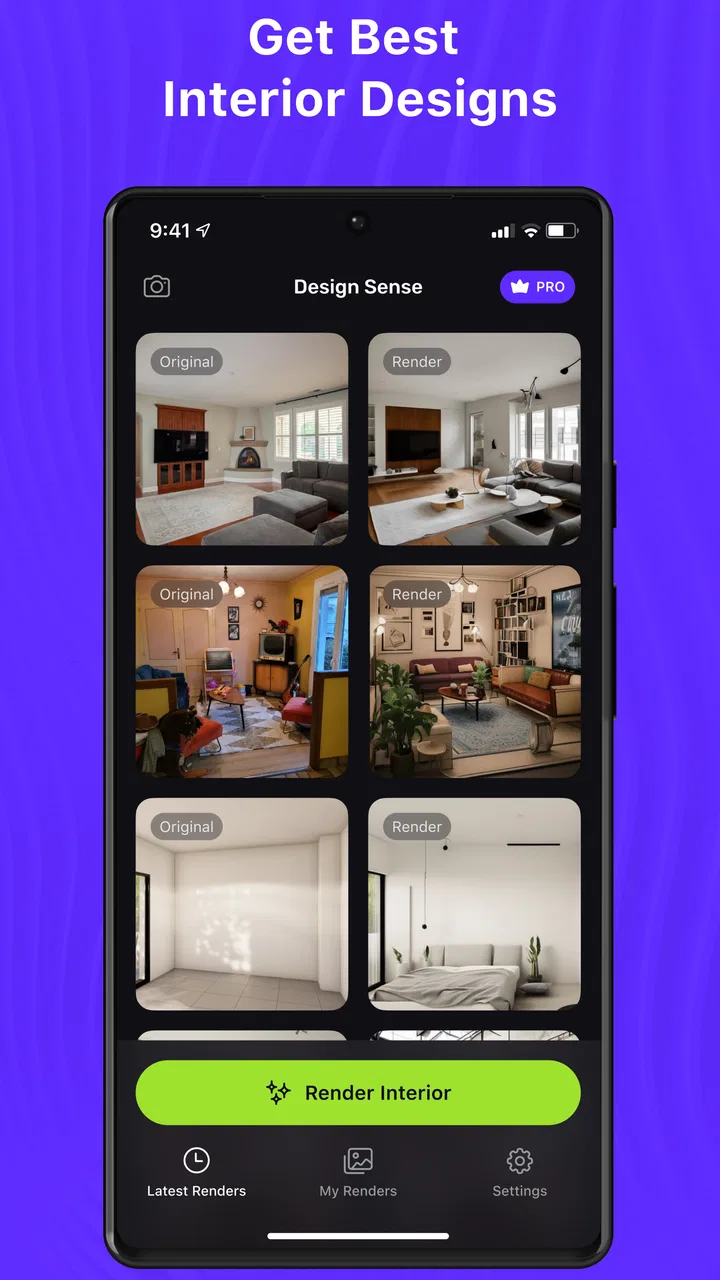
For an everyday example, imagine that I am working on a small living room. I would take a clean, reasonably well-lit image, remove distracting clutter where possible, and keep the camera angle consistent. I would then explore one design direction at a time. A warm, minimalist version should be judged separately from a colorful eclectic version; otherwise I am comparing too many changes at once.
This is one of the most important habits I found: I do not treat the first generated concept as a final answer. I use it to identify elements worth keeping, such as a lighter wall treatment, a different seating arrangement, or a stronger contrast between the floor and furniture. The useful output is often the decision it helps me make, not the image itself.
DesignSense AI is especially convenient for people who can recognize that a room needs improvement but struggle to visualize alternatives. It gives those users a more immediate way to discuss ideas with a partner, decorator, or contractor. I can show a direction and say, “This mood is close, but the furniture should stay,” which is much easier than describing an abstract preference.
Keeping expectations realistic
AI-based interior concepts can look persuasive while still being impractical. A generated image may suggest a beautiful arrangement without proving that the proposed furniture fits, that walking space remains comfortable, or that the lighting works at different times of day. I therefore separate visual inspiration from physical planning.
For accurate decisions, I still use a tape measure, a basic floor plan, and the dimensions of products I am considering. DesignSense AI helps me choose a direction; it does not replace those checks. This distinction is particularly important in narrow rooms, rental properties, kitchens, and spaces where doors, windows, radiators, or outlets restrict placement.
I also find it helpful to save the original room image beside each concept. Without that comparison, it is easy to remember the imagined version more favorably than the actual space. Keeping both views makes the app part of a repeatable design process rather than a source of attractive but disconnected pictures.
Settings and choices worth checking before judging the result
The most useful “setting” is often the input itself. A straight-on image gives the app a different challenge from a dramatic wide-angle photograph. If the room is poorly lit or filled with temporary objects, the design result may reflect those distractions. I would not immediately blame the app for a weak concept until I have tested a cleaner image from a more useful viewpoint.
I also approach style choices as experiments rather than permanent commitments. I might begin with a broad direction, then change only one variable in the next attempt: the color mood, the level of decoration, or the perceived material palette. This makes it easier to understand which change actually improved the room.
That one-change-at-a-time method is a practical advantage for experienced users. It prevents the common mistake of producing several radically different images and learning nothing from them. If I alter the wall color, furniture style, lighting mood, and accessories together, I cannot tell which part made the concept feel better.
Another useful check is whether the proposed style suits the room’s existing constraints. A concept can be attractive but unsuitable for a room with limited daylight or heavy daily use. I ask myself whether the design would still work with children, pets, storage needs, cleaning routines, and the furniture I already own. The app can inspire the look, but I have to supply the lifestyle test.
Building faster repeatable patterns
Once I know what I want to compare, I can work faster by preparing a small set of repeatable prompts or design intentions in my notes. For example, I might keep separate descriptions for “calm and warm,” “bright and practical,” and “dark with natural textures.” I then reuse the same room image while changing the direction deliberately.
This is more efficient than improvising a new request every time. It also makes the comparisons fairer. If the room photograph and the basic goal remain stable, I can focus on whether the visual language suits me rather than wondering whether a completely different input caused the change.
I would also avoid generating a large collection of near-duplicates just because the app makes experimentation easy. A smaller, labeled set is more useful. I name each saved concept by its purpose, such as “lighter walls” or “more storage-friendly,” instead of relying on memory. That turns the app into a lightweight design notebook.
For a shared household project, this workflow is particularly effective. I can prepare a few clearly different directions, show them to the other people involved, and ask focused questions: Which color feels easiest to live with? Which arrangement leaves the clearest path? Which version works with the furniture we already have? The app becomes a conversation tool rather than an authority that decides for everyone.
There is also a useful trade-off between speed and control. DesignSense AI is appealing because it reduces the effort needed to see a concept, but that convenience can encourage passive browsing. I get more value when I enter each experiment with a question. “Can this room feel warmer without becoming darker?” is more productive than endlessly asking for another makeover.
Where the app helps more than traditional alternatives
Compared with starting in a conventional drawing or modeling program, DesignSense AI feels more accessible for early exploration. Traditional tools can provide stronger control over dimensions, placement, and technical detail, but they often require more setup and a willingness to learn their interface. For someone deciding between styles, that overhead can stop the process before it begins.
Compared with browsing furniture catalogs or social-media mood boards, the app has a more personal starting point because I can think about my own room rather than someone else’s finished space. A mood board can show what I like in isolation; an AI concept can help me ask whether that preference belongs in my particular room.
Those alternatives remain better in specific situations. A floor-planning tool is more appropriate when exact measurements and circulation matter. A catalog or retailer visualizer is more useful when I need to see a real product, its actual finish, or its available dimensions. A professional designer remains the stronger option for complex renovations, accessibility requirements, structural changes, or a whole-home plan.
In other words, DesignSense AI occupies an early and middle stage of the process. It is stronger than a blank page for visual brainstorming, but weaker than a precise planning tool for execution. Understanding that position prevents disappointment and helps me use it where it has the greatest advantage.
Limitations I would consider before spending money
The free entry point is welcome, but the presence of paid items means I would not assume that every useful capability is included without checking the purchase screen carefully. The possible price range is broad, so I would compare what a purchase unlocks with how often I expect to use the app. Someone redesigning one room may have a different value calculation from someone who regularly creates concepts.
I would also be cautious about treating visual consistency as guaranteed. AI-generated design concepts can be persuasive in one attempt and less convincing in another, particularly when the source image is complicated. Small room details may not receive the same attention as the overall mood. If an important existing feature disappears from the concept, I would preserve the original photograph and verify the idea independently.
The app is not the right choice for users who need technical drawings, dependable scale, product-level accuracy, or detailed renovation documentation. It may also frustrate anyone who wants complete manual control over every object. In those cases, a dedicated floor planner, 3D modeling application, or human consultation would be a better investment of time.
Privacy-conscious users should make their own careful decision before importing personal images, especially photographs that reveal private rooms or identifiable household details. I would review the app’s current permissions and privacy information on the device before uploading anything sensitive. That is a sensible step for any image-based service, not just this one.
Compatibility, cost, and the practical starting point
The app is suitable for Everyone and requires Android 8.0 or later. It has reached over 100K installs, while its average rating is 3.2 from around 1.4K ratings. I read that combination as a sign of real interest but also a reason to keep expectations measured: plenty of people are trying the concept, yet the experience is not universally satisfying.
It is currently version 27, and it was released on March 23, 2023. I would still check the version shown on my own device before relying on a particular interface, because app screens and available options can change through updates. The safest approach is to install it, test the free workflow with a non-sensitive room image, and decide whether the results are useful before considering any purchase.
The age rating makes it approachable for general household experimentation, but that does not mean every result will be equally suitable for every user. A child can enjoy exploring colors and styles, while an adult still needs to handle measurements, budgets, purchases, and safety decisions. The app is easy to approach; the design decisions remain personal and practical.
Who will get the most from it
I would recommend DesignSense AI to renters planning a visual refresh, homeowners who need help choosing a direction, students exploring interiors, and anyone preparing a conversation about a room. It is also useful when two people have different tastes and need something concrete to react to. Seeing a shared space interpreted in several ways can reveal preferences that are difficult to express verbally.
It is less suitable for a professional who needs dependable deliverables or for a user who expects the app to calculate a renovation. It is also not ideal for someone who already knows exactly which products, dimensions, and finishes they want. In that situation, a product-specific planner or precise design software would likely offer more control with less ambiguity.
My strongest tip is to use the app before shopping, not after. I would first create a small set of directions, identify the features that repeat across the best concepts, and only then look for furniture or paint. This reduces impulse purchases based on a single attractive image and helps create a coherent plan.
My verdict after using it as a design companion
DesignSense AI works best as a visual thinking tool, not as a complete interior-design system. I like the way it lowers the barrier to exploring a room and gives uncertain ideas a visible form. The experience becomes considerably more useful when I use consistent photographs, change one design variable at a time, label the concepts, and verify every practical decision outside the app.
Its limitations are just as important as its appeal. The average rating of 3.2 suggests that the polished promise will not translate equally well for everyone, and the optional purchase range deserves careful attention. I would also avoid depending on it for exact layouts, construction work, or product accuracy.
For a friend who says, “I know this room needs something, but I do not know what,” I would suggest trying DesignSense AI as a low-commitment first step. I would tell them to use the free experience with a simple room image, keep their expectations grounded, and compare the concepts against real measurements and daily habits. If they want inspiration and a faster way to discuss possibilities, it is worth exploring. If they need precision and control, I would point them toward a dedicated planning tool instead.
Used with that boundary in mind, the app has a clear place in my workflow: it helps me move from vague dissatisfaction to a shortlist of visual directions. The final decision still belongs to me, but getting to that decision can be much easier.
FAQs for DesignSense AI
01What is DesignSense AI, and what can I use it for?
DesignSense AI is an artificial-intelligence design assistant intended to help users create, improve, and explore visual content more efficiently. Depending on the available tools and subscription level, it may assist with generating design ideas, refining layouts, producing visual concepts, or providing suggestions for colors, typography, and composition. It is best viewed as a creative aid rather than a complete replacement for professional design software or human judgment.
02Is DesignSense AI suitable for beginners without design experience?
Yes, DesignSense AI can be useful for beginners because AI-assisted workflows may simplify tasks that normally require knowledge of design principles. Users can experiment with prompts, templates, or guided suggestions instead of creating everything from scratch. However, the quality of the result still depends on how clearly you describe your goal and how carefully you review the generated output. Beginners should expect to make adjustments rather than accept every result immediately.
03Does DesignSense AI offer free features, or does it require a subscription?
DesignSense AI may provide a free download or limited trial, but access to advanced tools, higher usage limits, premium templates, exports, or commercial features can depend on the current subscription plan. Before downloading or starting a trial, check the app-store listing and in-app pricing carefully. Pay attention to renewal terms, trial duration, and whether unused credits or premium access expire when a subscription is canceled.
04Can I use designs created with DesignSense AI for commercial projects?
Commercial usage depends on DesignSense AI’s current licensing rules, the type of content generated, and the plan associated with your account. Do not assume that every free asset, template, image, font, or AI-generated result is automatically cleared for business use. If you plan to publish advertisements, sell products, create client work, or build a brand, review the app’s terms and verify the rights of any third-party material before using the final design.
05What should I know about privacy when using DesignSense AI?
Before uploading images, brand materials, documents, or personal information, review DesignSense AI’s privacy policy and permission requests. AI design services may process uploaded content on remote servers, and some platforms may retain data to provide, secure, or improve their services. Avoid submitting confidential client files, private photographs, passwords, or sensitive business information unless you understand how the data is stored, processed, and deleted.
Pros
- Generates several design variations quickly for comparison.
- Useful for exploring color palettes
- layouts
- and visual styles.
- Can help non-designers create more polished concepts.
- Speeds up early brainstorming and reduces repetitive work.
- Suitable for creating inspiration for social media and marketing assets.
Cons
- AI suggestions may require substantial manual refinement.
- Results can feel generic when prompts lack specific detail.
- Some advanced features may require a paid subscription.
- Export options and image quality may vary by plan.
- Uploaded content may raise privacy concerns for sensitive projects.

DesignSense AI
Gallery